← Guides

Setup guide · Hermes Agent by Nous Research

Your personal AI assistant lives here now.

A friendly, step-by-step guide to setting up Hermes on your own server — no tech background needed. Bring this to your setup session.

How to use this guide: The first three sections explain what Hermes is and how it's different. Your homework is the part to do before we meet — about 20 minutes. Installation and Configure are what we do together on the day. Keep this open on your screen during our session.

Watch first

Hermes Agent in five minutes

If you want the quick mental model before installing anything, start here. This short overview explains what Hermes Agent is and why it is different from opening a normal chatbot tab.

See it in action

Real conversations from a real household

This is what "always on your phone, ready in seconds" actually looks like.

Imagine having someone who already knows your family's schedule, your kids' routines, your household quirks — and who's always on your phone, ready in seconds.

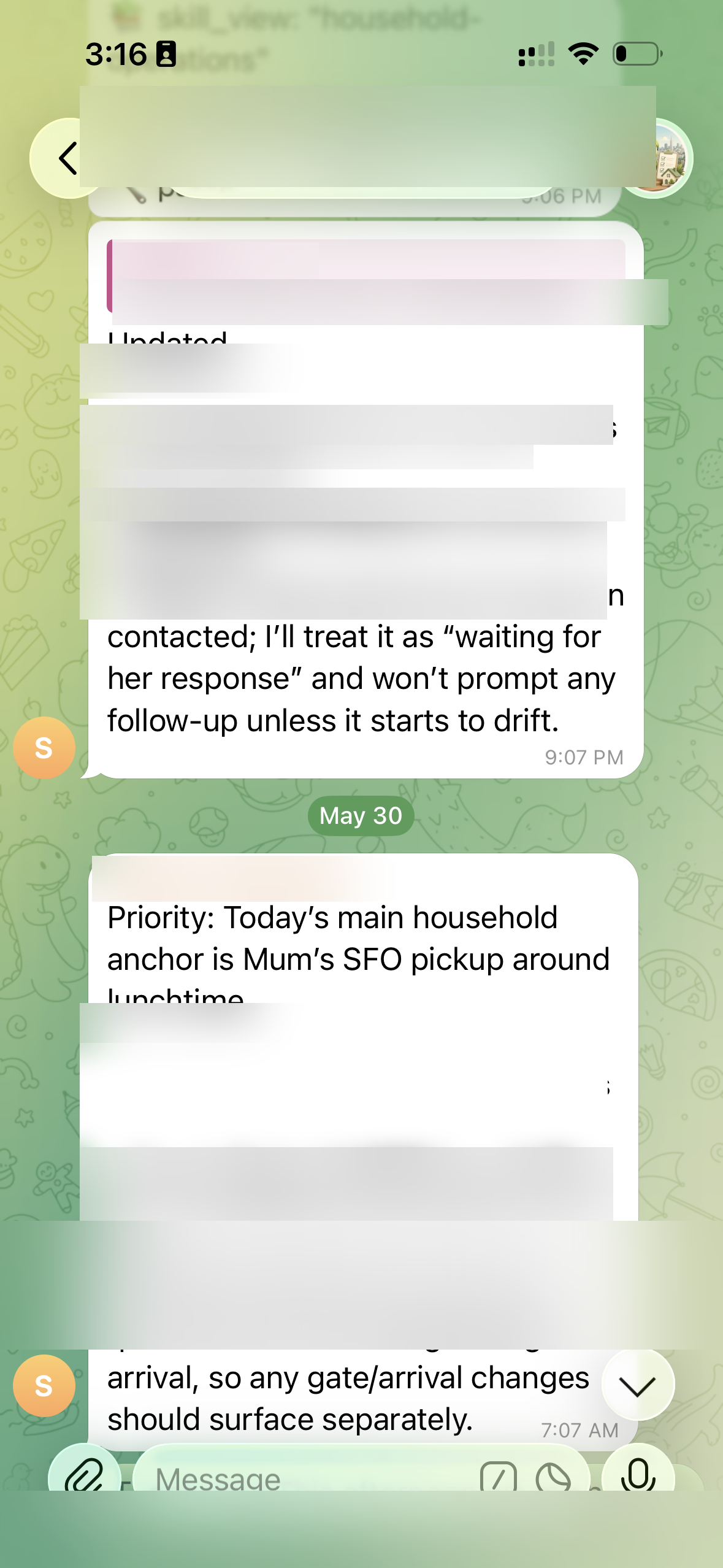
Hermes coordinating family logistics over Telegram
Household coordination

Hermes tracked who was picking up Mum from the airport, confirmed the nanny situation, and coordinated Saturday plans — all from one Telegram message.

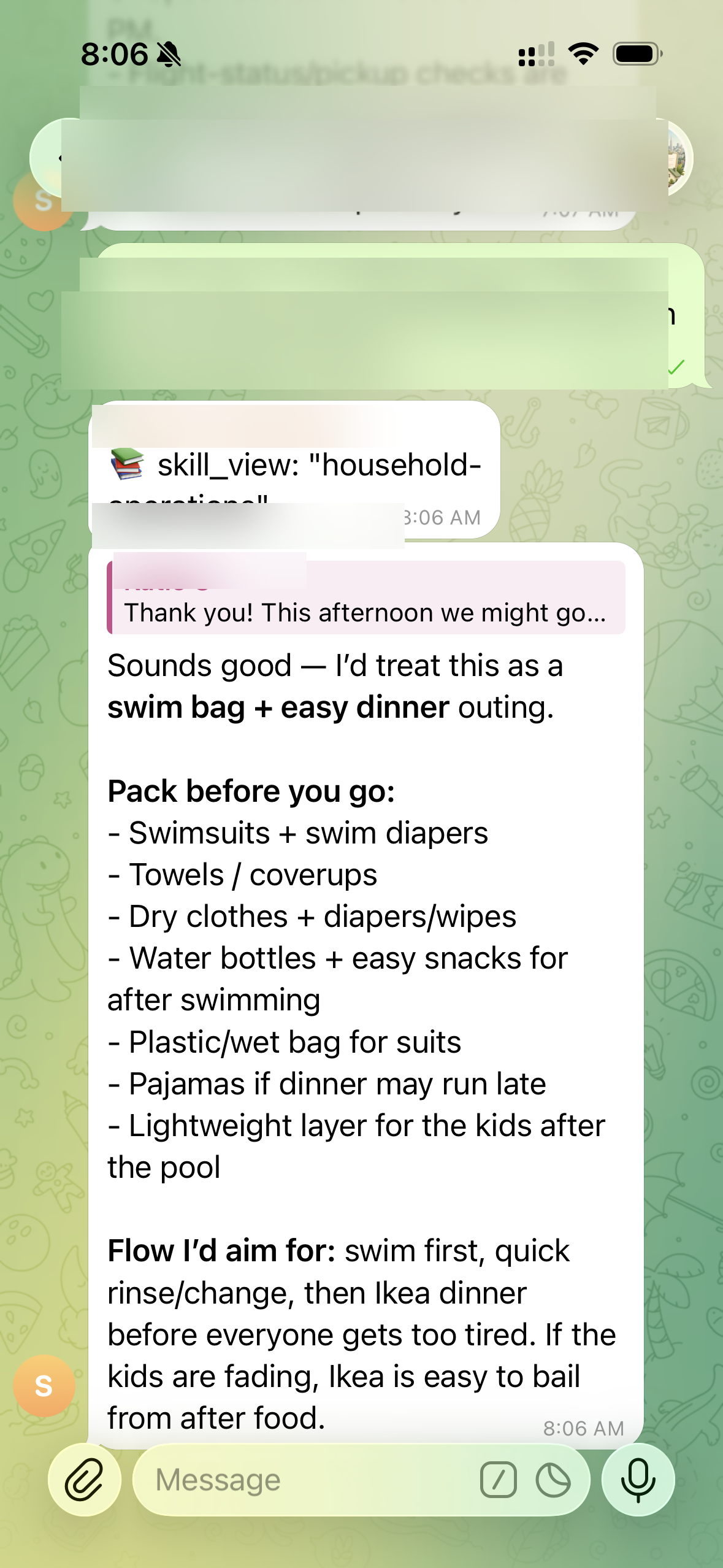
Hermes building a packing list for a spontaneous pool trip
In-the-moment planning

You mentioned a pool trip. Hermes instantly built a full packing list and suggested the best flow for the afternoon so the kids don't crash before dinner.

This is the goal. By the end of our session, you'll have your own Hermes — personalised to your family, reachable from your phone, running in the background so you don't have to hold everything in your head.

What is Hermes?

Read this first — no jargon, promise

Hermes is an open-source AI assistant that runs on a small server you control — not inside someone else's app. Think of it like having a capable personal assistant who:

Talks to you anywhere

Telegram, WhatsApp, email — wherever you already are.

Remembers things

Learns your family's preferences and never forgets.

Runs tasks automatically

Morning briefings, reminders, grocery lists — on a schedule.

Your data, your control

It's not a cloud product someone else owns. It's yours.

The key difference from ChatGPT: Hermes lives on a server you control and keeps running even when you're not talking to it. It's more like hiring a personal assistant than using a website.

How does Hermes compare?

Not a better chatbot — a different kind of tool

You might already use ChatGPT or Claude for questions here and there — and that's great. But those tools wait for you to come to them. Hermes works the other way around.

ChatbotsChatGPT · Claude · Gemini Claude CoworkDesktop workspace Hermes ✦Your own assistant
Who starts the conversation? You have to remember to open it and ask. You have to sit down at your computer and ask. ProactiveHermes texts you first — you don't have to remember.
Proactive reminders? No — silent until you reach out. Yes — if you configure a routine on your desktop first. Yes"Just a heads up — school pickup is in 20 minutes." No trigger needed.
Routine tasks? No. Yes, but set up on your desktop. YesTell it once and it keeps doing it automatically — no prompting again.
Understands your family dynamics? Only what you tell it in that session. You can load documents, but it doesn't learn from conversation. EvolvesBuilds a picture of your family over time — the more you use it, the better it gets.
Works on your phone? Yes — mobile app. No — desktop only. YesIn Telegram, just like texting a friend.
Best for A quick question in a rare free moment — when you remember to ask. Sorting a term's worth of school notices, forms, or an insurance policy. Best forCarrying the mental load so nothing falls through the cracks — and you're not always the one chasing.
1

Before we meet

Your homework

Do these before our session — about 20 minutes total.

1

Create a fresh Gmail account for Hermes

This gives Hermes its own email address to send and receive from — completely separate from your personal inbox.

Go to: accounts.google.com/signup  ·  Suggested format: yourname.hermes@gmail.com

Important: Write down the email address and password before our session — you'll need them.
2

Sign up for OpenAI Codex — the $20/month plan

Hermes needs an AI brain to think and respond. We'll use OpenAI for this. You need an API key — a long password-like code that connects Hermes to the AI.

  • Step 1: Go to platform.openai.com and create an account.
  • Step 2: Go to Billing settings, add a payment method, select the $20/month plan.
  • Step 3: Go to API Keys → "Create new secret key" → copy it and save it somewhere safe.
Treat your API key like a password. Don't share it or post it anywhere.
3

Set up a VPS — your Hermes "home base"

Hermes needs a computer that's always on, always connected, and dedicated to running your agent. A VPS (Virtual Private Server) is a small computer that lives in the cloud and runs 24/7 — even when your laptop is closed and everyone's asleep.

The other reason not to run it on your personal laptop: your agent has access to the file system of whatever machine it runs on. Keep it on its own dedicated machine so it can never touch your personal documents or photos.

Down the line: A VPS is the easiest start, but you can later move Hermes to a dedicated home machine — a Mac Mini or a repurposed old laptop. Same idea: a separate computer running quietly in the background, just for your agent.

DigitalOcean Recommended

The most beginner-friendly option — clean dashboard, excellent guides, simple setup. $6/month.

digitalocean.com → Create Droplet → Ubuntu 22.04 → Basic ($6/mo)

Hostinger VPS Budget

The most affordable at ~$5/month. Good if you're already a Hostinger customer.

hostinger.com → KVM 1 plan → Ubuntu 22.04

Vultr

A solid alternative — similar price and ease. Good if DigitalOcean isn't in your region.

vultr.com → Cloud Compute → Ubuntu 22.04 → $6/mo
Whichever you choose: always select Ubuntu 22.04. Once set up, your provider gives you a server IP address, a username (usually root), and a password. Write all three down and bring them to our session.
4

Make sure you have a terminal app

A terminal is how we'll connect to your VPS and run commands — a window where you type instructions and press Enter.

On a Mac? You already have Terminal built in — search "Terminal" in Spotlight. That's all you need.

Want something nicer? Ghostty and iTerm2 are free, modern alternatives — entirely optional.

You don't need to open it yet — just make sure you have one available.
5

Install Telegram on your phone

Telegram is how you'll message Hermes once it's running — like messaging a contact, from anywhere. Free, 2 minutes to set up.

Download Telegram from the App Store (iPhone) or Google Play (Android) and create an account with your phone number. We'll connect it to Hermes during the session.

6

Think about what you'd want Hermes to help with

We'll personalise Hermes for your household during setup — but it helps to have a rough idea. Jot down anything that would genuinely make your life easier.

Things to consider: Morning briefing with weather + calendar · Meal planning and grocery lists · Kids' school reminders · Email drafting · Weekly household summary · Anything that falls through the cracks in your week.
2

Installation — step by step

We do this together. You just follow along.

Estimated time: 45–60 minutes. You don't need to understand every detail.

1

Connect to your VPS

⏱ 5 min

Open your terminal app. You'll see a blinking cursor — you type instructions here and press Enter. Type the command below to connect to your server, replacing the placeholder with your actual server IP address.

connect to your server — replace with your IP
ssh root@YOUR_SERVER_IP_HERE

It'll ask for your server password. Type it and press Enter — you won't see the characters as you type, that's normal.

First time connecting? It may ask "Are you sure you want to continue connecting?" — type yes and press Enter.
2

Run the Hermes installer

⏱ 10–20 min

Once connected, paste the line below and press Enter. This downloads and installs Hermes automatically.

paste this, then press Enter
curl -fsSL https://hermes-agent.nousresearch.com/install.sh | bash

You'll see a lot of text scrolling past — this is completely normal. The whole process takes 10–20 minutes on a fresh server.

If it asks questions like "Install ripgrep? [Y/n]" — just press Enter to accept the default. When in doubt, Enter is always safe.
3

Run the setup wizard

⏱ 5–10 min

After installation, a setup wizard launches automatically. If it doesn't, type:

hermes setup

The wizard will ask you to:

  • Enter your OpenAI API key (the one you copied earlier)
  • Connect messaging platforms — we'll do Telegram here
  • Set a name for your assistant
Don't have everything ready? You can skip any question and come back later with hermes config edit.
4

Create a Telegram bot and connect it

⏱ 5 min

This is what makes Hermes feel like a real assistant — you message it just like a friend on Telegram, from anywhere.

  • Open Telegram and search for @BotFather
  • Tap Start, then type /newbot
  • Give your bot a name (e.g. "Home Assistant") and a username ending in bot
  • BotFather gives you a token — a long string of numbers and letters. Copy it.
  • Paste the token into the Hermes setup when it asks for your Telegram Bot Token
After this step: find your new bot in Telegram and send it a message — and Hermes will reply.
5

Install the gateway service

⏱ 2 min

The "gateway" keeps Hermes listening for your messages in the background — even when you're not actively using it. On a VPS, this runs 24/7. When the installer asks to install it as a background service, say Yes. Or run it manually:

hermes gateway install
You only do this once. After this, Hermes restarts automatically if your server ever reboots.
3

Configure Hermes for your household

The part that makes it actually useful

We'll use a guided interview that generates all your config files for you.

6

Run the household setup interview

⏱ 10–15 min

Open a chat with Hermes on Telegram (or in the terminal with hermes) and paste this message:

paste this message to Hermes
Read the hermes-home scaffold at https://github.com/katiemelon/Hermes-home and set up my household workspace. Start with hermes-home/BOOTSTRAP.md — interview me, recommend modules, and generate my workspace files.

Hermes will ask questions in small batches about your household, schedule, and what you'd like help with. Answer honestly — there are no wrong answers.

It will cover: Morning briefings · Meal planning · Kids' school schedule · Email drafting · Weekly summaries · Automated reminders.
7

Copy the generated files to your Hermes home

⏱ 5 min

After the interview, Hermes produces your personalised workspace files. Copy them into the right folder on your server:

cd ~/.hermes

We'll create the files here together. The key ones are:

  • SOUL.md — your assistant's personality and household rules
  • IDENTITY.md — who you are and your household shape
  • HEARTBEAT.md — your daily and weekly rhythm
  • MEMORY.md — things Hermes should always remember
Good news: you never edit these in code. They're plain English — update them any time by telling Hermes "update my memory to include…" or editing the file in a normal text editor.
4

Useful commands to know

Quick reference for when you're on your own

Chat in the terminal

Opens a direct chat session. (Most of the time you'll use Telegram.)

hermes

Change settings or API keys

Reconfigure anything you set up earlier.

hermes config edit

Update to the latest version

Keep Hermes current with new features.

hermes update

Check what's running

See the background gateway status.

hermes gateway status

See your scheduled automations

List the tasks Hermes runs on a schedule.

hermes cron list

Glossary

Plain-English definitions

VPS
Virtual Private Server — a small computer in the cloud that runs 24/7. This is where Hermes lives. Your provider hosts it; you control it completely.
Terminal
The app where you type instructions to your computer or server. Built into Macs, or use Ghostty / iTerm2. It's where you connect to your VPS and run Hermes commands.
SSH
"Secure Shell" — the command you use to connect your laptop to your VPS securely. Like a remote control for your server.
API key
A long password-like code that lets Hermes connect to OpenAI's AI. You get it from platform.openai.com. Keep it secret — treat it like a bank PIN.
Gateway
The part of Hermes that runs in the background, listening for your Telegram messages around the clock.
Bot / BotFather
A "bot" is an automated Telegram account — your personal Hermes contact. BotFather is Telegram's official tool for creating one.
SOUL.md
A plain-English file that defines Hermes' personality and your household's rules. Think of it as the briefing you'd give a new assistant on day one.
hermes-home
The scaffold we use to configure Hermes for your household — runs an interview and generates all your config files. You never edit code.
Cron / automations
Scheduled tasks — things Hermes does automatically at set times. Described in plain English; no coding needed.
Open-source
Software whose code is public and free to use. Hermes is open-source — you can see exactly what it does, and it won't disappear if a company changes its mind.

You did it

You've got a personal AI assistant.

Hermes is running on your own server, personalised to your family, and reachable from your phone via Telegram — any time, anywhere. The longer it runs, the more useful it gets.

hermes — open chat hermes setup — reconfigure hermes update — stay current hermes cron list — automations